> For the complete documentation index, see [llms.txt](https://docs.virgo.net/llms.txt). Markdown versions of documentation pages are available by appending `.md` to page URLs; this page is available as [Markdown](https://docs.virgo.net/wallet/tutorials/understanding-and-finding-your-seed-phrase.md).
# Understanding and Finding Your Seed Phrase
## Understanding and Finding Your Seed Phrase
### What is a Seed Phrase?
A seed phrase, also known as a recovery phrase or mnemonic, is a series of 12 to 24 random words generated when you create your wallet. It represents the master key that allows you to restore your account and access your cryptocurrencies.
* **Function of the Seed Phrase**: The seed phrase is used to generate all private keys associated with your wallet addresses. Losing your seed phrase means losing access to your funds.
### How to Find Your Seed Phrase
If you need to retrieve your seed phrase after setting up your account:
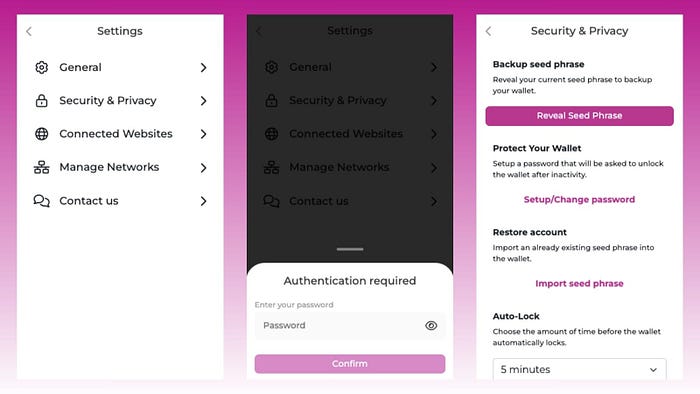
* **Access the App Settings**: Open Virgo Wallet, go to the settings menu, then to the Security & Privacy section. You will need to enter your password to gain access. Click on reveal your seed phrase. Write it down again and make sure you store it safely.
## Security Tips for Your Seed Phrase
* **Never Share Your Seed Phrase**: Anyone with your seed phrase can access your funds.
* **Store It Offline**: Write your seed phrase on a piece of paper and keep it in a safe place, like a safe. Avoid storing it digitally to prevent hacking risks.
* **Make Copies**: For added security, make multiple copies of your seed phrase and store them in different secure locations.